Dependencies
This is precisely where attacks on the software supply chain take place. The OpenSSF Secure Supply Chain Consumption Framework (S2C2F) provides a structured maturity model for how organisations should use open-source software. Unfortunately, however, the S2C2F is limited to GitHub projects. We therefore sought comparable solutions for our Python projects that do not rely on GitHub.
Choose your dependencies carefully
Before adding a dependency, you should check whether you actually need it, as every dependency increases your attack surface. Fewer or smaller dependencies mean fewer potential points of attack. When you add a dependency, you can assess the security situation using the OpenSSF Scorecard:
A low score gives you an indication of how much trust you should place in a project with limited security practices.
Is there a security policy?
Ideally, a SECURITY file or similar should have been published alongside the dependency. This file should contain information on
how a security vulnerability can be reported without it becoming publicly visible,
the procedure and timeline for disclosing the vulnerability,
and links, such as URLs and email addresses, where support can be requested.
Are CI tests carried out?
Before code is merged into pull or merge requests, tests should be carried out to help identify errors at an early stage and reduce the number of vulnerabilities in a project.
Are fuzzing tools used?
Fuzzing, or fuzz testing, feeds unexpected or random data into your programme to uncover bugs. Regular fuzzing is important for identifying vulnerabilities that could be exploited by others, particularly as fuzzing can also be used during an attack to find the same vulnerabilities.
Does your project use fuzzing?
Is the repository name included in the OSS-Fuzz project list?
Is ClusterFuzzLite used in the repository?
Are there any custom language-specific fuzzing functions in the repository, for example using atheris?
Are static code analysis tools used?
Static test procedures test the source code before the application is run. This can prevent known classes of errors from being inadvertently introduced into the codebase.
Is the source code free of checked-in binary files?
Generated executable files in the source code repository (such as Python
.pyc files) increase the risk, as they are difficult to verify and may
therefore be out of date or have been maliciously manipulated. These issues can
be addressed with verified, reproducible builds; however, the resulting
executable files should not be placed back into the source code repository.
Can malicious code be injected?
Protected Git branches allow rules to be defined for merging changes into the main and release branches, such as automated static code analysis using Ruff, Pysa, Wily, and code reviews via so-called merge requests.
Are code reviews carried out?
Code reviews help to identify unintended vulnerabilities or the potential injection of malicious code. Where applicable, this can help detect attacks in which a team member’s account has been compromised.
Are people from multiple organisations involved?
This is seen as an indication of a smaller number of trusted code reviewers. To check this, you can search the profiles for different entries in the Company field. It is desirable to have at least three different companies represented in the last 30 commits, with each of these team members having made at least five commits.
Are dependencies declared and pinned?
In your project, dependencies used during the build and release process should be pinned. A pinned dependency should be explicitly set to a specific hash, rather than just a variable version or a version range.
Spack records these hashes for the respective environment in the spack.lock and uv in uv.lock file files.
Tip
However, I usually only manage these files in Git for
apps. For libraries, I typically just
restrict the version range of the dependencies in the pyproject.toml
file.
For apps, this can help reduce the following security risks:
Testing and deployment are carried out using the same software, which reduces deployment risks, simplifies debugging and enables reproducibility.
Compromised dependencies do not undermine the security of the project.
Substitution attacks – that is, attacks aimed at confusing dependencies – can thus be countered.
However, locking down dependencies should not prevent software updates. You can reduce this risk by
using automated tools that notify you when dependencies in your project are out of date
updating applications that lock down dependencies promptly.
Specify the dependencies
Warning
When publishing a library on PyPI, you should use as broad version
ranges as possible in the dependencies section of your
pyproject.toml file to avoid conflicts when others wish to install
your library alongside other libraries. The guidance in this section applies
exclusively to the deployment of applications.
Consider the following scenario: uv add writes the approximate version of
your dependency to your pyproject.toml file, for example,
"MYDEP>=3.0.5". If the project is set up from scratch, running uv
sync may result in version 3.0.6 of MYDEP being installed. This
could lead to a malicious version being downloaded unnoticed, without a single
line of code having been changed.
A fixed version "MYDEP==3.0.5" is better, as this ensures we do not
receive a version newer than the one tested in the project. However, this still
does not provide an integrity check: if, during an attack, the maintainer’s
account were compromised and a new release—containing a backdoor—were published
for the same version but for a different platform, this too could be installed
unwittingly. To mitigate this attack scenario, in future only releases for a
single version within a 14-day window will be permitted
on PyPI.
Hash pinning is more secure – it creates a cryptographic fingerprint of the
package file, which is fixed in the uv.lock file using uv.
Alternatively, you can use pip-compile --generate-hashes from the
pip-tools:
$ python -m pip install pip-tools
$ pip-compile --generate-hashes pyproject.toml -o requirements.txt
See also
However, you should not only use hash pinning for your Python dependencies, but also, for example, for your pre-commit checks and GitHub Actions.
Hash pinning does not, however, protect against installing a malicious package for the first time; in that case, you would simply be pinning the hash of the malicious package. You should therefore combine hash pinning with vulnerability scans and delayed deployment.
See also
Automatically update dependencies
Dependencies should be updated regularly to avoid vulnerabilities, minimise incompatibilities between dependencies and prevent complex upgrades when updating from an outdated version. A variety of tools can help you stay up to date.
Out-of-date dependencies make a project vulnerable to attacks exploiting known
vulnerabilities. Therefore, updating dependencies should be automated by
checking for out-of-date dependencies and updating them where necessary. With
prek, you can regularly update your uv.lock
file:
- repo: https://github.com/astral-sh/uv-pre-commit
  rev: 6a280ba12b7901e47757c868c8c13c6a624c9ecb # 0.11.7
  hooks:
    - id: uv-lock
      args: ["--exclude-newer = 'P3D'", "--quiet"]
--exclude-newerDependency cooldown, which excludes packages that have only been published on PyPI for a few days – or, in the case of
P3D, for just three days. This gives PyPI administrators the opportunity to respond to malware during this period.
See also
Alternatively, you can also use Dependency bot for assistance.
Vulnerability scans
Dependency pinning prevents unauthorised changes – but what happens if you’ve
pinned a version that contains a known security vulnerability? Researchers are
constantly discovering new CVEs
in packages. A package that was fine yesterday could already have a critical
security vulnerability today. Unpatched security vulnerabilities in your
dependencies can easily be exploited and should therefore be fixed as soon as
possible. To do this, you can use uv audit to check whether your project has
any known security vulnerabilities in its dependencies:
$ uv audit
warning: `uv audit` is experimental and may change without warning. Pass `--preview-features audit-command` to disable this warning.
Resolved 115 packages in 16ms
Found 12 known vulnerabilities and no adverse project statuses in 114 packages

Vulnerabilities:

idna 3.12 has 1 known vulnerability:
- GHSA-65pc-fj4g-8rjx: Internationalized Domain Names in Applications (IDNA): Specially crafted inputs to idna.encode() can bypass CVE-2024-3651 fix
  Fixed in: 3.15
  Advisory information: https://github.com/kjd/idna/security/advisories/GHSA-65pc-fj4g-8rjx
…
uv add, uv sync, etc. can now scan for previously
identified malware during every synchronisation process. This feature is not
enabled by default, but can be easily enabled by setting UV_MALWARE_CHECK=1
in the shell.
See also
If a vulnerability is found in a dependency, you should update to a non-vulnerable version; if no update is available, you should consider removing the dependency.
If you believe that the vulnerability does not affect your project, you can
define exceptions for uv audit in the pyproject.toml file, for
example
[tool.uv.audit]
ignore = ["PYSEC-2022-43017", "GHSA-5239-wwwm-4pmq"]
or, better still,
[tool.uv.audit]
ignore-until-fixed = ["PYSEC-2022-43017"]
See also
You can also incorporate the vulnerability analysis carried out using
uv-audit into your prek checks:
- repo: https://github.com/astral-sh/uv-pre-commit
  rev: d9fca3320346514799461a80b0753eb45d707d46 # 0.11.28
  hooks:
  - id: uv-audit
    files: ^(uv\.lock|pyproject\.toml)$
Security checks should be carried out automatically. To do this, you can use
uv audit, for example, in a GitHub Action:
name: Security Scan
jobs:
  security:
    runs-on: ubuntu-latest
    steps:
      - uses: actions/checkout@9c091bb21b7c1c1d1991bb908d89e4e9dddfe3e0 # v7.0.0
      - uses: astral-sh/setup-uv@08807647e7069bb48b6ef5acd8ec9567f424441b # v8.1.0
      - run: uv audit
or in a GitLab CI/CD pipeline:
security-scan:
  image: ghcr.io/astral-sh/uv:python3.14
  script:
    - uv audit
As an alternative to uv audit, you can also use osv or pip-audit for this. There is also a corresponding
GitHub Action: pypa/gh-action-pip-audit.
Avoid dependency conflicts
Dependency conflicts can arise from the way package managers resolve names when both public and private package repositories are used. A malicious package published on PyPI that shares the same name as your internal package may be installed by the build system instead. With pip, the attack works as follows:
When running
python -m pip install --extra-index-url
https://EXAPMPLE.COM/simple MYPACKAGE
or similar, you would probably expectMYPACKAGEto be fetched from your index athttps://EXAPMPLE.COM/simple.However,
pipchecks all indexes and selects the highest version.So if there is a higher version of
MYPACKAGEon PyPI containing malicious code, that version will be installed.
You can work around this problem by using --index-url to specify a single
index. In this case, pip assumes that your internal index acts as a proxy
for the public PyPI; however, if it only hosts internal packages, you
can first configure it as a PyPI proxy:
[install]
index-url = https://EXAPMPLE.COM/simple
trusted-host = EXAPMPLE.COM
SBOMs can help to identify potential naming conflicts by providing an inventory for verification; however, these are retrospective checks – so they only show you, after the fact, what you have installed.
uv, on the other hand, usually uses the first-index strategy,
meaning it takes the first index in which a package is found. This avoids the
dependency conflicts described above:
1[[tool.uv.index]]
2name = "internal"
3url = "https://EXAPMPLE.COM/simple"
4explicit = true
5
6[tool.uv.sources]
7mypackage = { index = "internal" }
- Line 4:
This index is used only for explicitly pinned packages.
See also
Verify package attestations
PyPI package attestations use Sigstore to provide cryptographic proof of a package’s provenance in accordance with PEP 740. Since gh-action-pypi-publish v1.11.0, these attestations have also been generated automatically. By the end of 2025, more than 50,000 projects were using Trusted Publishing, and 17 per cent of uploads included attestations. Trusted Publishing has also been extended to organisations and self-managed GitLab instances.
In addition to package attestations, PEP 740 also defines SLSA provenance attestations. For use cases outside PyPI, actions/attest can generate these SLSA provenance and SBOM attestations for each artefact.
In the case of the attack on Ultralytics, these attestations could have been used to identify which versions originated from a compromised workflow and which were legitimate – without the need for any manual forensic analysis. Sigstore’s transparency logs provide an independent audit trail with precise timestamps and details of the provenance of every published artefact.
Add time-based defences
When a malicious package is published on PyPI, it is immediately available worldwide. Detection times vary – some attacks are detected within a few hours, whilst others go unnoticed for weeks or months. In 2025, there were over 2,000 malware reports, 66 per cent of which were processed within four hours.
Whilst waiting before using newly published packages does not provide a guarantee, it does reduce the risk, as the community is likely to uncover obvious threats within a short time.
Modern package managers support time-based filtering. uv has the
--exclude-newer option, and pip ≥ v26 has introduced the
--uploaded-prior-to option for the same purpose, both of which rely on
metadata regarding the upload time in accordance with PEP 700.
Use internal package repositories within your organisations
In smaller organisations, a simple mirror of PyPI that makes packages available with a one-week delay can already reduce the security risk to the organisation. However, you should ensure that you can override this delay for critical security patches. If you use internal package repositories within your organisation, you can also implement further security measures:
Automated security scans of packages
Automated building of packages with fromager
Respond quickly if you discover a malicious package
If you discover a compromised package on your system, acting quickly can often prevent major damage.
Isolate the package immediately
Stop all deployments that use this dependency and block the package version on your internal mirror, if you operate one. The aim is to prevent further installations whilst you investigate the cause further.
Assess the damage
Check logs and process data to determine whether the malicious code was executed. Identify which sensitive data the package may have accessed: environment variables, login credentials, cloud tokens, etc. Use your SBOM to identify all affected projects within your organisation.
Mitigate the damage
Change all login credentials that the package may have accessed: API keys, database passwords, cloud credentials. Scan systems for signs of compromise and check outgoing network connections for signs of data exfiltration.
Remove the dependency completely
Update to a known bug-free version and remove the dependency completely. Run
pip-auditto ensure that no further vulnerabilities have been introduced. Then update your lock files with the corrected version.Report the malicious package
You can report the malicious package via PyPI’s security reporting system. Also notify the relevant people in your organisation and any customers who may be affected. Document the incident: What happened? How was the package discovered? What changes have you made to prevent a recurrence?
Check whether your dependencies are still being maintained?
You should regularly check whether a dependency has been archived. However, the OSSF Scorecard checks are only successful if the project is older than 90 days. A lack of active maintenance is not necessarily always a problem, though: smaller utilities in particular usually require maintenance only very rarely. A lack of active maintenance therefore simply indicates that you should investigate the situation more closely.
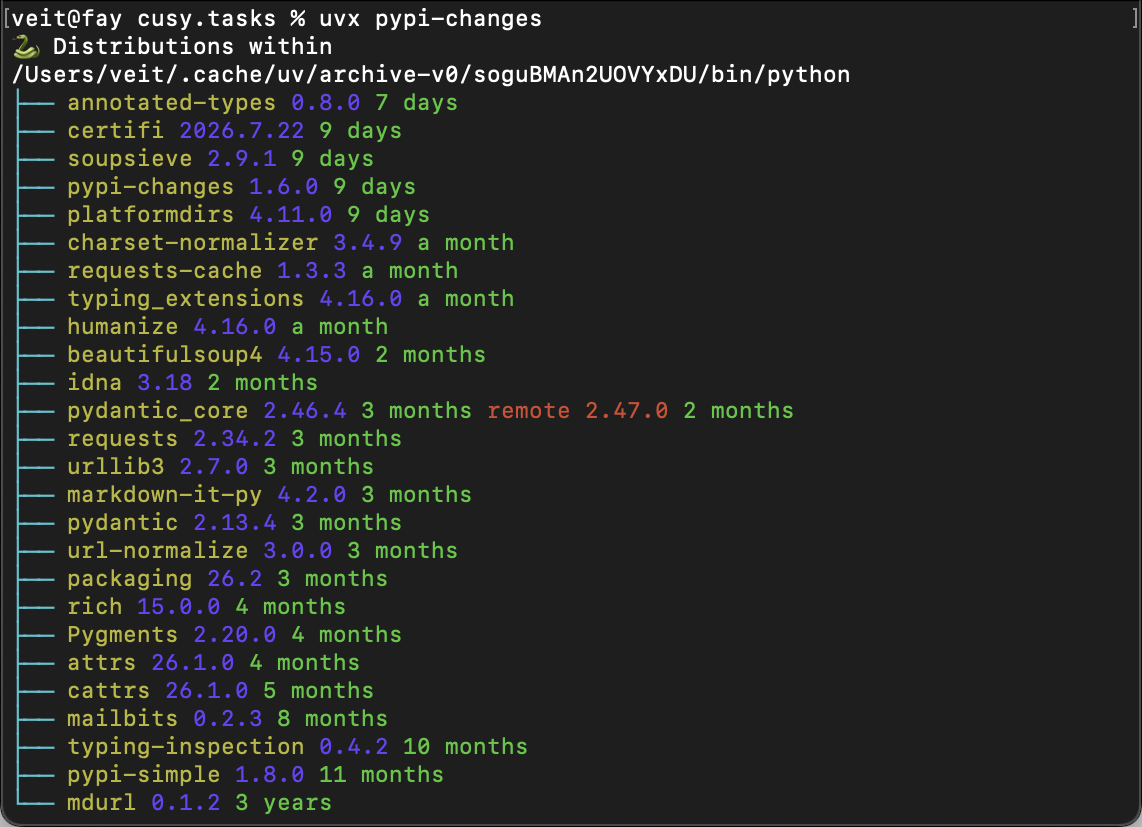
pypi-changes is a CLI tool that checks the packages installed for a Python interpreter and compares them with the latest versions on PyPI. It shows which packages are out of date, how long ago the respective version was released, and highlights significant version jumps so that you can make informed decisions regarding upgrades, for example:
Alternatively, you can also view the PyPI versions of a project with badges, for example:
Package name |
Current PyPI version |
|---|---|
pypi-simple |

|
mdurl |

|
+---------------+-------------------------------------------------------+
| Package name  | Current PyPI version                                  |
+===============+=======================================================+
| pypi-simple   | .. image:: https://img.shields.io/pypi/v/pypi-simple  |
|               |    :alt: PyPI Version                                 |
|               |    :target: https://pypi.org/project/pypi-simple      |
+---------------+-------------------------------------------------------+
| mdurl         | .. image:: https://img.shields.io/pypi/v/mdurl        |
|               |    :alt: PyPI Version                                 |
|               |    :target: https://pypi.org/project/mdurl            |
+---------------+-------------------------------------------------------+
See also